You're withdrawing USDT from Bybit or Binance to sell it, and the exchange asks you to pick a network from a long list. One USDT is worth the same everywhere, but the route your coins take and the cost of the trip vary. Send them on a network accepted by the exchange office you're selling to, meaning a licensed service like GeCrypto that buys your USDT for cash or a card payout. If several networks work, pick the one with the lowest fee at the exchange or wallet you're sending from. Choosing the wrong network costs more than any fee, because you can't always get the coins back.
Why USDT runs on several networks
Tether issues a separate version of USDT on each blockchain it supports. Each version has its own smart contract and its own coin for paying fees. In withdrawal menus the versions are usually labeled by token standard, so TRON shows up as TRC20, Ethereum as ERC20 and BNB Chain as BEP20. You can often tell the network from the start of an address: TRON addresses begin with a capital T, and TON addresses start with UQ or EQ. That doesn't work for Ethereum and BNB Chain, where addresses on both networks begin with 0x. If the sender and the recipient choose different networks, the coins may never arrive.
Some networks are best avoided. Tether no longer issues or redeems USDT on Omni Layer (a protocol built on top of Bitcoin), Bitcoin Cash SLP, Kusama, EOS or Algorand. You can still move these tokens, but there's almost nowhere to exchange them.
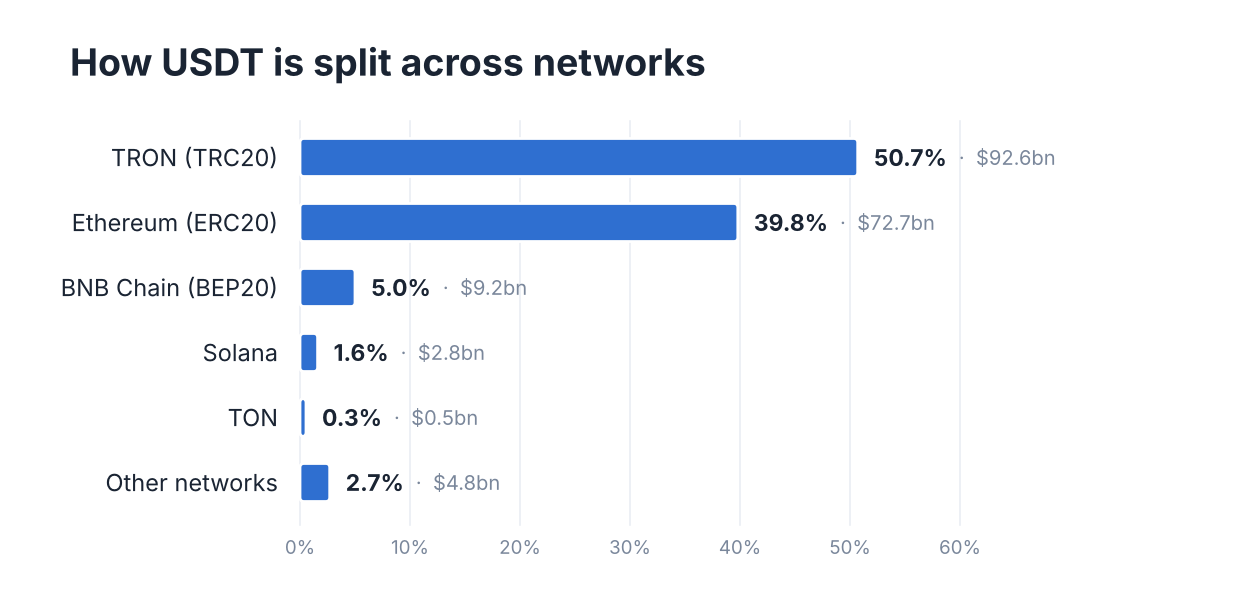
More than 180 billion USDT is in circulation today. Over half of it was issued on TRON and about 40% on Ethereum. All the other networks together hold less than a tenth, so nearly every exchange and exchange office accepts USDT on TRC20 and ERC20.
Five networks you'll run into most often
TRC20 (TRON)
TRON charges fees in "energy", an internal network resource. You get energy by staking some of your TRX (many wallets still call it freezing), or you can rent it from third-party services. If you have no energy, the network burns a few TRX from your balance, and roughly twice as much if the recipient's address doesn't hold any USDT yet. The energy price changes from time to time, so check the exact fee in your wallet before you send. If you send USDT often, it's cheaper to stake some TRX or rent energy. Keep in mind that staked TRX only comes back to your balance 14 days after you unstake it, and renting energy costs money too.
Cheap, fast transfers have a downside: scammers like them too. In 2024, TRON accounted for 58% of illicit crypto volume[1]. If you buy USDT on TRC20 from a random seller on a P2P platform, you risk getting coins linked to scams or other crime. A licensed exchange office will flag them in its checks, and your deal may take longer.
ERC20 (Ethereum)
Many people still think of ERC20 as the expensive option. That reputation goes back to 2021, when a single transfer could cost tens of dollars. After a series of upgrades, each Ethereum block fits more transactions and fees have dropped sharply. At quiet times, sending USDT costs a few cents. When activity spikes, the fee (on Ethereum it's called gas) can jump within minutes.
BEP20 (BNB Chain)
When you withdraw from Binance, BEP20 is often the cheapest option. USDT on BNB Chain is issued by Binance itself: the exchange holds regular USDT from Tether and creates its own token backed by it. For small amounts this hardly matters, but with large sums Binance is one more intermediary between you and Tether.
TON
Tether also issues USDT on TON, and you can keep it right in Telegram Wallet. If you're sending USDT on TON to an exchange or an exchange office, check whether a memo is required. It's a short code the recipient uses to match the transfer to your account, and in most TON wallets you enter it in the Comment field.
Solana
A Solana transfer costs a fraction of a cent and confirms almost instantly. There isn't much USDT on Solana (under 2% of the total) because USDC, another stablecoin, is more popular there.
What you pay when you send USDT
The sender always pays the fee. When you send from your own wallet, the fee is paid in the network's coin: TRX, ETH, BNB, TON or SOL. An exchange charges a fixed withdrawal fee that it sets itself, with the network fee already included. Exchange fees change often and don't always follow what a transfer costs on the network itself. Binance, for example, charged almost four times more for a TRC20 USDT withdrawal than for ERC20, while at Bitget ERC20 was the pricier one[2]. The old rule that TRC20 is always cheaper no longer holds, so compare fees on the withdrawal screen right before you send.
Common network mistakes and how to avoid them
Mixing up ERC20 and BEP20
This is the mistake people make most often. Ethereum, BNB Chain and other networks built on the same technology, such as Arbitrum and Polygon, use identical-looking addresses that start with 0x. Your wallet won't stop you if you pick the wrong network. The coins arrive on a different network, and an exchange office expecting them on ERC20 won't see the transfer. If the coins went to your own wallet, you can usually see them once you add the right network to it. If you sent them to an exchange or an exchange office, it's harder. You can only try to recover the coins through support, and it doesn't always work. We've covered recovery in detail in our article on coins sent on the wrong network. Before you send, check both the address and the network name on the withdrawal screen against your order.
Forgetting the memo on TON
Exchanges and exchange offices often receive USDT on TON at a single shared address and tell customers apart by the memo. Without it, the coins reach the recipient but don't land in your account, because the system can't tell whose they are. You'll have to contact support, send the transaction hash (the transfer's ID, which you'll find in your wallet history) and wait for someone to find the transfer manually. The memo is shown next to the address on the deposit screen, so copy both.
Not enough coins to pay the fee
This only applies when you send from your own wallet, not from an exchange. The wallet has to hold some of the network's coin to pay the fee: TRX on TRON, ETH on Ethereum, BNB on BNB Chain. Without it, either the wallet won't let you send, or the transaction fails. The USDT stays where it was, and any fee already spent isn't refunded. This happens most often on TRON, when you send to a new address and the fee comes out twice as high as usual. Keep a little extra TRX (or ETH, or BNB) in the wallet and check the fee it shows before you confirm.
Copying a lookalike address
Scammers use a lookalike address to send active wallets 0.01 USDT or a zero-value transfer. This trick is called address poisoning. The lookalike's first and last characters match an address you send to regularly, but the middle is different. In your wallet history it looks like any other transfer, and if you copy the address from there next time, your coins go to the scammer, and you won't get them back. Only take the address from your order or your wallet's address book, and check every character, including the middle.
Receiving fake USDT
Anyone can create a token and call it USDT or Tether USD. These fakes turn up in P2P deals. The seller sends "USDT" and your wallet shows a balance, but an exchange office won't accept the coins. Genuine USDT is tied to Tether's own contract: TR7NHqjeKQxGTCi8q8ZY4pL8otSzgjLj6t on TRON and 0xdAC17F958D2ee523a2206206994597C13D831ec7 on Ethereum. A fake token has a different contract address. To check, look up the transaction hash in a block explorer, a public site that shows every transfer on the network (Tronscan for TRON, Etherscan for Ethereum). If the contract doesn't match, don't pay the seller.
How to choose a network before you sell USDT
Open your order with the exchange office and see which networks it accepts USDT on.
If your coins are on an exchange, pick whichever network on that list has the lowest withdrawal fee right now.
If your coins are in your own wallet, make sure you have enough of the network's coin (TRX, ETH and so on) to cover the fee.
Copy the address from your order and check that the network on the withdrawal screen matches the one in the order.
Send a large amount in two steps: first a test transfer of at least the minimum deal amount, then the rest once the test arrives.
TRC20 is GeCrypto's main network for USDT, but we accept other popular networks too. The rate doesn't depend on the network you choose and is the same for cash and card payouts. We pay out US dollars in cash at our office in Tbilisi and send lari, dollars or euros to a card at any Georgian bank. The minimum deal is $100. We walk through this kind of deal step by step on our page about selling USDT to a Georgian bank card.
[1] TRM Labs, review of illicit crypto volume in 2024.
[2] Binance and Bitget USDT withdrawal fees.